Thursday, May 3, 2012

Friday, April 27, 2012
UploadIt
Available for Purchase in North America via asowsm@opentext.com


Screenshot


Compatibility
- 7.x
- 9.x
- 10.x
Description
- Batch image/file upload
- Compatible with folder authorization packages
- Easy installation
- Support sub folders
- Supports all browsers
Accessibility
- SmartTree, Start -> Administer Project Settings -> Project -> Folders, Action Menu, UploadIt
- SmartEdit, Open page, right click Plugin-ins, UploadIt
Tuesday, April 10, 2012
ASP to .NET Session Transfer
Generally, there are two ways to transfer ASP sessions to .NET sessions. Also, these methods are not limited to reddot/opentext wsm/cms, but are useful in general day to day coding. Please note that the code illustrations do not take security concerns into consideration, securing session access can be achieved via IIS configuration or addition code checking.
session_store.aspx
Push Method
session_transfer.asp<%
Dim sActionPageURL, sContent
sActionPageURL = "http://localhost/cms/plugins/session_store.aspx"
sContent = "?"
For Each Item In Session.Contents
sContent = sContent & Item & "=" & server.URLencode(Session.Contents(item)) & "&"
Next
'Construct POST Object
set http_obj=server.CreateObject("MSXML2.ServerXMLHTTP")
http_obj.Open "POST", sActionPageURL , false
http_obj.setRequestHeader "Content-type", "application/x-www-form-urlencoded"
http_obj.send(sContent)
'Display Response
'Response.Write (http_obj.ResponseText)
set http_obj=nothing
%>
session_store.aspx
<%@ Page language="c#" validateRequest="false"%>
<%
    for(int i=0;i<Request.Form.Count;i++)
    {
        Session[Request.Form.GetKey(i)]=Request.Form[i].ToString();
        'Response.Write(Request.Form.GetKey(i));
        'Response.Write("=");
        'Response.Write(Session[Request.Form.GetKey(i)]);
    }

    Response.Write(Session.Count);
%>
Thursday, March 22, 2012
Rendertag, Project Performance, Product Support
Project performance is closely tied to rendertag usage. Here are some rendertag usage best practices that should be taken into consideration when implementing a project.
Store:Set( key, val )
This is a rendertag that allows storage of variable, but it is unofficial and unsupported. Should projects experience performance or content output issues while using this rendertag, product support may be denied or delayed due to slow priority since it not a product issue but an implementation issue.
Additionally, upon full site publish or multiple users accessing the same Store value may experience a race condition since everyone is trying to write and read from the same variable. For example, generated link for Page B links to Page A because the link value was read milliseconds before it was updated.
.Elements.GetElement(), .GetPathArray()
A page object get loaded into memory prior to any page info marshaling/inspection call, wide usage in project cause the server to use up memory much quicker. Since the memory garbage collector in .NET could not keep up with the clean up, server tend to become unresponsive more often.
Another issue with rendertag and this rendertag in particular is caching. Content retrieve via rendertag get cached, but the cache do not get update notification upon targeted content change, hence rendertag continues to display old content. Please note, this issue do not occur if rendertag is used within navigation template.
Foreach and Store
Content retrieved within foreach rendertag will experience caching issue. Content output within foreach rendertag via Store rendertag will experience race condition upon heavy multiple access.
Store:Set( key, val )
This is a rendertag that allows storage of variable, but it is unofficial and unsupported. Should projects experience performance or content output issues while using this rendertag, product support may be denied or delayed due to slow priority since it not a product issue but an implementation issue.
Additionally, upon full site publish or multiple users accessing the same Store value may experience a race condition since everyone is trying to write and read from the same variable. For example, generated link for Page B links to Page A because the link value was read milliseconds before it was updated.
.Elements.GetElement(), .GetPathArray()
A page object get loaded into memory prior to any page info marshaling/inspection call, wide usage in project cause the server to use up memory much quicker. Since the memory garbage collector in .NET could not keep up with the clean up, server tend to become unresponsive more often.
Another issue with rendertag and this rendertag in particular is caching. Content retrieve via rendertag get cached, but the cache do not get update notification upon targeted content change, hence rendertag continues to display old content. Please note, this issue do not occur if rendertag is used within navigation template.
Foreach and Store
Content retrieved within foreach rendertag will experience caching issue. Content output within foreach rendertag via Store rendertag will experience race condition upon heavy multiple access.
Wednesday, March 21, 2012
Find Page By Guid 2
Download


Screenshot


Compatibility
- 7.x
- 9.x
- 10.x
- 11.x
Description
- Find page by guid
Accessibility
- In SmartTree, Start -> Administer Project Structure -> Project, Action Menu, Find Page By Guid
Check Multiple Page Connections
Download


Screenshot
Compatibility
- 7.x
- 9.x
- 10.x
- 11.x
Description
- Search all page instances of a content classes for pages with multiple page connections
- Option to fix pages with multiple connections should the connection is not a main link and connected to an anchor
Accessibility
- In SmartTree, Select content class, Action Menu, Check Multi Page Connection
Tuesday, March 20, 2012
Auto Order Elements 2
Download
Screenshot
Compatibility
- 7.x
- 9.x
- 10.x
- 11.x
Description
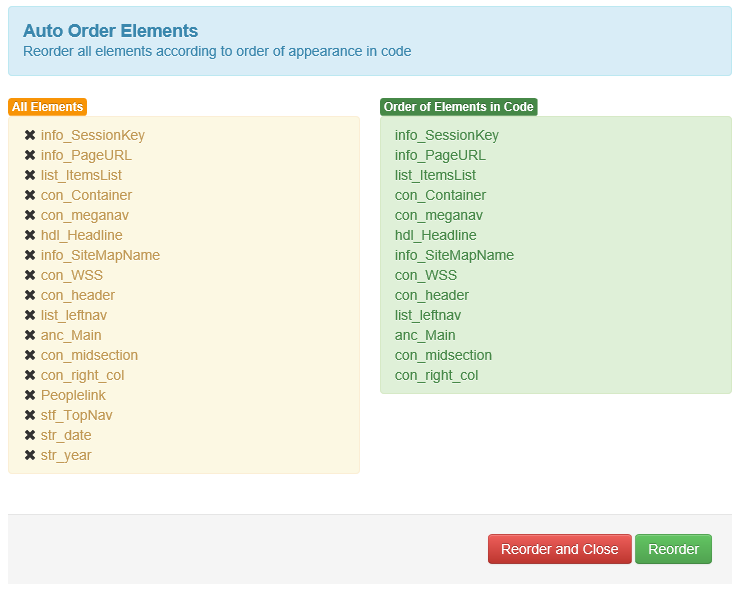
- Allow user to quickly reorder elements according to element order in page, making edit elements via form more user friendly
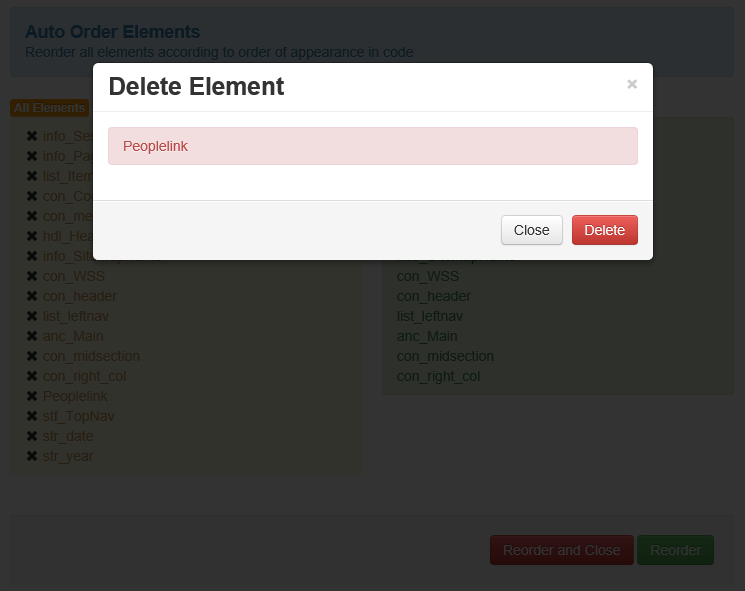
- Allow user to quickly inspect, find, and delete unused elements within content class
Accessibility
- In SmartTree, Select content class, Action Menu, Auto Order Elements
Subscribe to:
Posts (Atom)