Pages

Showing posts with label content class. Show all posts

Friday, December 12, 2014

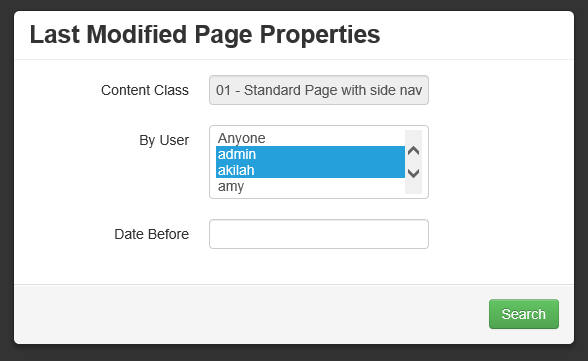
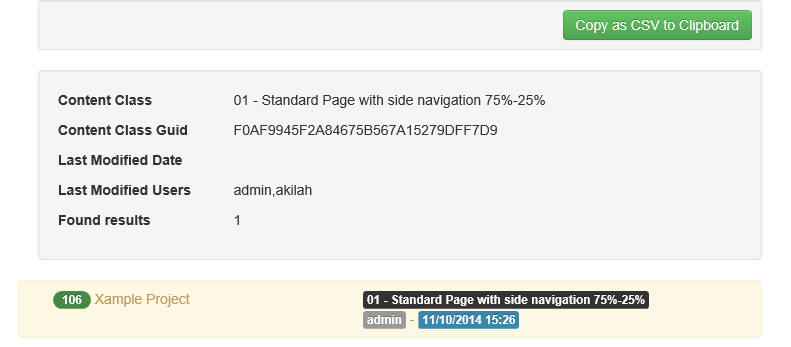
Last Modified Report

Download

Screenshot


Compatibility
  • 7.x
  • 9.x
  • 10.x
  • 11.x

Description
  1. Generate report based user name, content class, and last modified date
  2. Generated report can be saved to a CSV format

Accessibility
  • In SmartTree, Start -> Administer Content Classes, action menu, Last Modified Report
  • In SmartTree, Start -> Administer Content Classes -> [Content Class Folder] -> [Content Class], action menu, Last Modified Report

Tuesday, June 3, 2014

Template won't save, especially CSS

The template editor is written in ASP. "Maximum Requesting Entity Body Limit" is the mechanism used to transit and save the code in the template editor.  By default, ASP setting in IIS is configured to accept a maximum of 200KB.

Solution: increase your "Maximum Requesting Entity Body Limit" setting under ASP under your CMS web application.  http://stackoverflow.com/questions/9466081/how-to-increase-request-accept-limit-for-asp-classic

Thursday, May 8, 2014

Getting Current Management Server RedDot CMS Project Name via JavaScript

This is the easiest way to get current project name without complicated rendertag or preexecution. Just make sure you are already use the JQuery.js library.
<script type="text/javascript">
 var TheRealUIContainerPage;
 var ProjectLabelText;
 if(window.opener){
  if(window.opener.name == 'ioActionMenu'){
   // smarttree
   TheRealUIContainerPage = top.opener.parent.parent.parent.parent.document;
   ProjectLabelText = $(TheRealUIContainerPage).find('body #ctl00_ctl00__bodyPlaceHolder__infoMenu_2 .ca_tb_txt').text();
  }
 }else{
  // smartedit
  TheRealUIContainerPage = window.parent.document;
  ProjectLabelText = $(TheRealUIContainerPage).find('body #ctl00_ctl00_ctl00__bodyPlaceHolder__infoMenu_2 .ca_tb_txt').text();
 }

 alert(ProjectLabelText);
</script>

Rendertag to Escape Double Quote and Single Quote

This is a solution posted by Tim Davis on https://groups.google.com/forum/#!topic/reddot-cms-users/ImqWdAN4XIY

You want to assign text placeholder content class a server side preexecution variable, but the text placeholder contains double quote, single quote and carriage return, which will cause preexecution error because the resulting code will be like this

Dim MyVar

MyVar = "<%txt_body%>"

'resulting code
'this cause syntax error, cannot have unescape quote inside quote
MyVar = "he says,"hello""

'this cause syntax error, cannot unclosed second line
MyVar = "first line
               second line"

What you can do is to use rendertag to escape the text. This method handles, &, ", ', accented character like (á, é, í, ó, ú, ü, ñ, ¿, ¡), and new line carriage return

Dim MyVar

MyVar = "<%!! Escape:HtmlEncode(<%txt_body%>) !!%>"

Wednesday, May 8, 2013

List versus Container Best Practices

There has been many confusions over when to use a list element or a container element. For Example, I want to have a slider module on my home page.

The flexslider has the following HTML code:

<div class="flexslider" id="myflexslider">
	<ul class="slides">
		<li>
			<img src="slide1.jpg" />
		</li>
		<li>
			<img src="slide2.jpg" />
		</li>
		<li>
			<img src="slide3.jpg" />
		</li>
		<li>
			<img src="slide4.jpg" />
		</li>
	</ul>
</div>
<script type="text/javascript" charset="utf-8">
    $('#myflexslider').flexslider();
</script>

The Bad Solution

Each slide is a page containing a slide image. Then a list placeholder is used to pull in images.

<!-- flexslider content class -->
<!IoRangeRedDotMode>
<div class="alert-reddot <!IoRangeNoEditMode>alert-error<!/IoRangeNoEditMode><!IoRangeRedDotEditOnly>alert-success<!/IoRangeRedDotEditOnly>">
    <div><!IoRedDotOpenPage> [<!IoRangeNoEditMode>Open to Edit<!/IoRangeNoEditMode><!IoRangeRedDotEditOnly>Close to Save<!/IoRangeRedDotEditOnly> Page]</div>
    <!IoRangeRedDotEditOnly>
    <div><!IoRedDot_lst_slides> [Manage Slides]</div>
    <!/IoRangeRedDotEditOnly>
</div>
<!/IoRangeRedDotMode>
<div class="flexslider" id="myflexslider">
    <ul class="slides">
        <!IoRangeList>
        <li>
            <!-- <%lst_slides%> -->
            <!IoRedDot_img_slide><%img_slide%>
        </li>
        <!/IoRangeList>
    </ul>
</div>
<script type="text/javascript" charset="utf-8">
    $('#myflexslider').flexslider();
</script>

This is a sub-optimal method because

  1. The slider pages will get published out as these useless HTML snippet pages, occupying space and unnecessarily indexed. Of course, one can prevent it by setting the template of the content class not to publish or use a content class without template. Nevertheless, it causes more work.
  2. After editing a slider page in SmartEdit, user can't submit or release the slider page because it is hidden behind a list. Of course, one can make the slider page hidden behind the list accessible in SmartEdit. Nevertheless, it causes more work.

The Current Best Practice Solution

Each slide is a page containing a slide image. Then a container placeholder is used to contain the pages.

<!-- flexslider content class -->
<!IoRangeRedDotMode>
<div class="alert-reddot <!IoRangeNoEditMode>alert-error<!/IoRangeNoEditMode><!IoRangeRedDotEditOnly>alert-success<!/IoRangeRedDotEditOnly>">
    <div><!IoRedDotOpenPage> [<!IoRangeNoEditMode>Open to Edit<!/IoRangeNoEditMode><!IoRangeRedDotEditOnly>Close to Save<!/IoRangeRedDotEditOnly> Page]</div>
    <!IoRangeRedDotEditOnly>
    <div><!IoRedDot_con_slides> [Manage Slides]</div>
    <!/IoRangeRedDotEditOnly>
</div>
<!/IoRangeRedDotMode>
<div class="flexslider" id="myflexslider">
    <ul class="slides">
        <%con_slides%>
    </ul>
</div>
<script type="text/javascript" charset="utf-8">
    $('#myflexslider').flexslider();
</script>
<!-- flexslider slide content class -->
<li>
    <!IoRedDotOpenPage><!IoRedDot_img_slide><%img_slide%>
</li>

Tuesday, April 2, 2013

Blockmark Usages

I hope the following blockmark usage examples would help clarify the many blockmarks and associated usages.

<!-- do not need conditional, no output if empty -->
<%stf_teaser%>


<!IoRangeConditional>
<div class="orange">
    <%stf_teaser%>
</div>
<!/IoRangeConditional>


<!IoRangeRedDotMode>
<!-- this is shown in SmartEdit, either open or closed
<div class="reddot-area">
    <!IoRedDotOpenPage>
    <!IoRangeNoEditMode>
    <!-- this is shown when this section is closed in SmartEdit -->
    <div class="reddot-closed">[Open to Edit]</div>
    <!/IoRangeNoEditMode>
    <!IoRangeRedDotEditOnly>
    <!-- this is shown when this section is open in SmartEdit -->
    <div class="reddot-opened">[Close to Edit]</div>
    <!/IoRangeRedDotEditOnly>
</div>
<!/IoRangeRedDotMode>


<!--
if you want to produce repeatable HTML with variable content,
and the links go to the DIFFERENT sub folder

<ul>
    <li><a href="/products/link1.htm">link 1</a></li>
    <li><a href="/news/link2.htm">link 2</a></li>
    <li><a href="/about-us/link3.htm">link 3</a></li>
</ul>
-->

<ul>
    <!IoRangeDynLink>
    <li><%anc_dyn_links%></li>
    <!/IoRangeDynLink>
</ul>


<!--
if you want to produce repeatable HTML with variable content,
and the links go to the SAME sub folder

<ul>
    <li><a href="/products/link1.htm">link 1</a></li>
    <li><a href="/products/link2.htm">link 2</a></li>
    <li><a href="/products/link3.htm">link 3</a></li>
</ul>
-->

<ul>
    <!IoRangeList>
    <li><%lst_links%></li>
    <!/IoRangeList>
</ul>

Thursday, January 31, 2013

Foreach Rendertag in Text Array Processing

<reddot:cms>
<foreach itemname="ArrayItem" object="Escape:Text(Test1,Test2).Split(Escape:Text(,))">
 <htmltext>
  <h2><%!! Store:ArrayItem !!%></h2>
 </htmltext>
</foreach>
</reddot:cms>

Thursday, March 22, 2012

Rendertag, Project Performance, Product Support

Project performance is closely tied to rendertag usage.  Here are some rendertag usage best practices that should be taken into consideration when implementing a project.

Store:Set( key, val )
This is a rendertag that allows storage of variable, but it is unofficial and unsupported. Should projects experience performance or content output issues while using this rendertag, product support may be denied or delayed due to slow priority since it not a product issue but an implementation issue.

Additionally, upon full site publish or multiple users accessing the same Store value may experience a race condition since everyone is trying to write and read from the same variable.  For example, generated link for Page B links to Page A because the link value was read milliseconds before it was updated.

.Elements.GetElement(), .GetPathArray()
A page object get loaded into memory prior to any page info marshaling/inspection call, wide usage in project cause the server to use up memory much quicker.  Since the memory garbage collector in .NET could not keep up with the clean up, server tend to become unresponsive more often.

Another issue with rendertag and this rendertag in particular is caching.  Content retrieve via rendertag get cached, but the cache do not get update notification upon targeted content change, hence rendertag continues to display old content.  Please note, this issue do not occur if rendertag is used within navigation template.

Foreach and Store
Content retrieved within foreach rendertag will experience caching issue.  Content output within foreach rendertag via Store rendertag will experience race condition upon heavy multiple access.
Monday, March 5, 2012

Breadcrumb: Rendertag Vs Placeholder

Generally, there are two ways to generate a breadcrumb

Method #1: Rendertag
<%!! Navigation:OutputArea(Breadcrumb) !!%>

Method #2: Placeholder
<!IoRangeBreadCrumb><%anc_breadcrumb%> &raquo; <!/IoRangeBreadCrumb> <%hdl_title%>

Instead of using rendertag, it is best practice to use native placeholder to generate the breadcrumb for the following reasons:
  1. When using rendertag to generate breadcrumb, the page must be in navigation structure.  For performance reasons, it is unwise to have a page in navigation structure for the sole purpose having a breadcrumb because this will not scale for sites with 200+ pages.  Large navigation structure = slow project.
  2. Hiding a page from breadcumb requires additional rendertag logic, which is another performance cost.  Whereas using breacrumb placeholder, simply select page, click "edit properties", and enable "Do not use for breadcrumb"

Wednesday, February 15, 2012

Management Server 10.1 with MSSQL 2008 Installation Checklist

Here is a simple checklist for Management Server 10.1 installation with MSSQL 2005/2008.

Note that this checklist prepares the system for Management Server installation using local MSSQL accounts.


Download Doc

Tuesday, January 31, 2012

Publishing Following Pages

Often, users would experience the issue of following page won't publish. This issue is actually template code related. Management Server will not publish pages that it cannot get to via link.

For example, pages are connected to lst_navigation but do not publish when "publish all following pages" option is selected.


That is because the following code is missing in the template code and Management Server cannot crawl to following pages.
<!--
<!IoRangeList>
<%lst_navigation%>
<!/IoRangeList>
-->

Friday, January 6, 2012

Duplicate Pages

Most publication issues can be caused by pages connected to multiple locations. The most common symptom is having duplicate pages on the site.

For example:  Both page 1 and page 2 are connected to multiple locations with different publication package at each location, so the pages will get published twice, each time to a different location.


Obsolete Solution (Not working in 9 or 10)
Edit the content class of "RSS Listing", use preexecution to replace islink=2 with islink=10 to trick CMS into thinking the following pages are references, hence not to crawl and publish following pages. 

All Version Compatible Solution
Use the list to pull info_page_guid from the connected page.
<!IoRangeList>
<!IoRangeNoRedDotMode><!IoRangeRedDotMode><!--<%lst_pages%>--><!/IoRangeRedDotMode><!/IoRangeNoRedDotMode>
<li><%!! Context:Pages.GetPage(Guid:<%inf_page_guid%>).GetUrl(Bool:True) !!%></li>
<!/IoRangeList>

Page 1 and page 2 still get published according to different publication packages, but links generated always point to the pages' main link

Thursday, December 8, 2011

Managing JS CSS XML as content classes in 10.1

Problem

Management Server treats all page instances as HTML pages and like to search for <head> and <body> tag to inject javascript code into them.  The issue is most noticeable in version 10.1.
If <head> and <body> tag are not found, MS injects those tags along with javascript snippets to the top of the page.
For CSS and JS pages managed in MS and linked via anchor, this invalidates the CSS and JS, hence user would notice some CSS styles not being applied, and JS library/function not loaded.

Solution

Include this code at the bottom of any CSS or JS content class that have page instances referenced/connected via anchor in NOT Publish Mode to avoid invalidation.
/** <html><he<!IoRangeNoRedDotMode><!/IoRangeNoRedDotMode>ad></head><body></body></html> **/