Pages

Showing posts with label project structure. Show all posts

Wednesday, October 23, 2013

Using #include in a project

Why

The most common need to use an include directive is to include/reuse a common piece of component of the site, such as header, footer and advertisement.

Common Pitfalls

When using a media or image element in place of actual file name, the generated path contains ., which is invalid pathing by default unless enabled in IIS. The other issue with leading . in pathing is one cannot use that in #include virtual.

' Code in CMS template
<!--#include virtual="<%med_transformer_asp%>"-->

' Generated code in SmartEdit or Page Preview.  Invalid code
<!--#include virtual="../ImageCache/521E5D7461214F71889B2A99C6CAD3F4/514EAAB6BEBB4F86B85AF45DB2A09374/TR/transformer.asp"-->
' Code in CMS template
<!--#include virtual="<%anc_transformer_asp%>"-->

' Generated code in SmartEdit or Page Preview.  Invalid code
<!--#include virtual="./PreviewHandler.ashx?Action=Preview&Mode=0&blahblahblahblah"-->

When using #include file directive, the pathing uses \, CMS publish pathing as /. Though this is a minor issue since both syntax are acceptable.

' desired syntax
<!-- #include file="common\header.htm" -->

' generated syntax
<!-- #include file="common/header.htm" -->

The biggest issue with #include file in CMS is that the path returned is incorrect

' Code in CMS template
<!--#include file="<%med_transformer_asp%>"-->

' Generated code in SmartEdit or Page Preview.
<!--#include file="../ImageCache/521E5D7461214F71889B2A99C6CAD3F4/514EAAB6BEBB4F86B85AF45DB2A09374/TR/transformer.asp"-->
' This maps to
' ASP\ReddotTemp\ImageCache\521E5D7461214F71889B2A99C6CAD3F4\514EAAB6BEBB4F86B85AF45DB2A09374\TR\transformer.asp 
' Instead of
' ASP\ImageCache\521E5D7461214F71889B2A99C6CAD3F4\514EAAB6BEBB4F86B85AF45DB2A09374\TR\transformer.asp 
' Code in CMS template
<!--#include file="<%anc_transformer_asp%>"-->

' Generated code in SmartEdit or Page Preview.
<!--#include file="./PreviewHandler.ashx?Action=Preview&Mode=0&blahblahblahblah"-->
' This maps to
' ASP\ReddotTemp\BC498EE1113D41F7AC877F3D5BD0738E\PreviewHandler.ashx?Action=Preview&Mode=0&blahblahblahblah
' The path is correct, but the file gets deleted as soon as it is generated and displayed.

One can work around the pathing issue with manual path correction

<!IoRangePreExecute>
' Code in CMS template
<!--#include file="../<%med_transformer_asp%>"-->
<!/IoRangePreExecute>

' Generated code during publication mode, invalid code, the file is published
' to the asp folder on the web server.  The asp folder is not on the CMS
' server, so preexecution is trying to use a file that doesn't exist
<!--#include file="../asp/transformer.asp"-->


Solution

If you simply want to use include to include a static file, like header. In publishing mode, use #include, which uses a anchor placeholder to reference the header page. When not publishing, use the header container placeholder, which references the header page.

<reddot:cms>
<if>
    <query valuea="Context:CurrentRenderMode" operator="==" valueb="Int:2">
        <htmltext>
   <!--#include file="<%anc_header%>"-->
        </htmltext>
    </query>
    <query type="else">
        <htmltext>
            <%con_header%>
        </htmltext>
    </query>
</if>
</reddot:cms>

If you want to include an asp library and use the library during SmartEdit, Page Preview, and Publishing, reference the absolute path via #include virtual directive

<!IoRangePreExecute>
' Code in CMS template
<!--#include virtual="/cms/plugins/asplib/transform.asp"-->
<!/IoRangePreExecute>

Wednesday, May 8, 2013

List versus Container Best Practices

There has been many confusions over when to use a list element or a container element. For Example, I want to have a slider module on my home page.

The flexslider has the following HTML code:

<div class="flexslider" id="myflexslider">
	<ul class="slides">
		<li>
			<img src="slide1.jpg" />
		</li>
		<li>
			<img src="slide2.jpg" />
		</li>
		<li>
			<img src="slide3.jpg" />
		</li>
		<li>
			<img src="slide4.jpg" />
		</li>
	</ul>
</div>
<script type="text/javascript" charset="utf-8">
    $('#myflexslider').flexslider();
</script>

The Bad Solution

Each slide is a page containing a slide image. Then a list placeholder is used to pull in images.

<!-- flexslider content class -->
<!IoRangeRedDotMode>
<div class="alert-reddot <!IoRangeNoEditMode>alert-error<!/IoRangeNoEditMode><!IoRangeRedDotEditOnly>alert-success<!/IoRangeRedDotEditOnly>">
    <div><!IoRedDotOpenPage> [<!IoRangeNoEditMode>Open to Edit<!/IoRangeNoEditMode><!IoRangeRedDotEditOnly>Close to Save<!/IoRangeRedDotEditOnly> Page]</div>
    <!IoRangeRedDotEditOnly>
    <div><!IoRedDot_lst_slides> [Manage Slides]</div>
    <!/IoRangeRedDotEditOnly>
</div>
<!/IoRangeRedDotMode>
<div class="flexslider" id="myflexslider">
    <ul class="slides">
        <!IoRangeList>
        <li>
            <!-- <%lst_slides%> -->
            <!IoRedDot_img_slide><%img_slide%>
        </li>
        <!/IoRangeList>
    </ul>
</div>
<script type="text/javascript" charset="utf-8">
    $('#myflexslider').flexslider();
</script>

This is a sub-optimal method because

  1. The slider pages will get published out as these useless HTML snippet pages, occupying space and unnecessarily indexed. Of course, one can prevent it by setting the template of the content class not to publish or use a content class without template. Nevertheless, it causes more work.
  2. After editing a slider page in SmartEdit, user can't submit or release the slider page because it is hidden behind a list. Of course, one can make the slider page hidden behind the list accessible in SmartEdit. Nevertheless, it causes more work.

The Current Best Practice Solution

Each slide is a page containing a slide image. Then a container placeholder is used to contain the pages.

<!-- flexslider content class -->
<!IoRangeRedDotMode>
<div class="alert-reddot <!IoRangeNoEditMode>alert-error<!/IoRangeNoEditMode><!IoRangeRedDotEditOnly>alert-success<!/IoRangeRedDotEditOnly>">
    <div><!IoRedDotOpenPage> [<!IoRangeNoEditMode>Open to Edit<!/IoRangeNoEditMode><!IoRangeRedDotEditOnly>Close to Save<!/IoRangeRedDotEditOnly> Page]</div>
    <!IoRangeRedDotEditOnly>
    <div><!IoRedDot_con_slides> [Manage Slides]</div>
    <!/IoRangeRedDotEditOnly>
</div>
<!/IoRangeRedDotMode>
<div class="flexslider" id="myflexslider">
    <ul class="slides">
        <%con_slides%>
    </ul>
</div>
<script type="text/javascript" charset="utf-8">
    $('#myflexslider').flexslider();
</script>
<!-- flexslider slide content class -->
<li>
    <!IoRedDotOpenPage><!IoRedDot_img_slide><%img_slide%>
</li>

Monday, February 11, 2013

HTML5 in Management Server 9, 10, and 11

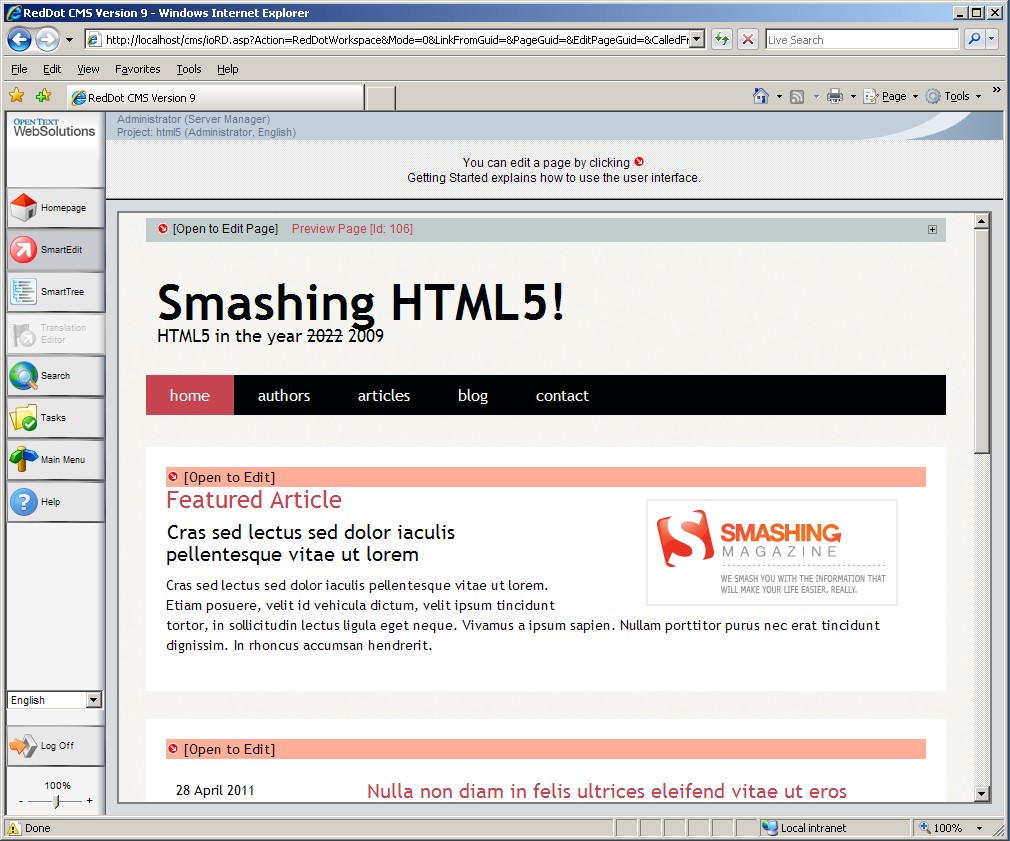
Just want to share a proof of concept project (proof that Management Server supports HTML5) I did based on Smashingmagzine's HTML5.

I wrote this project a few years back, when Management Server was still called CMS, to be more exact, CMS 9.

SmartEdit in CMS 9, IE8
SmartEdit in CMS 9, FireFox
SmartEdit in CMS 9, IE9
SmartEdit in CMS 10, IE9

It is recommended to use projects with HTML5 code after 10.1 SP2 HF18 (Build 10.1.2.391) because the Telerik/RadEditor text editor now also support HTML5 code and would not strip them out.


Download HTML5 Project Export (CMS 9)

Monday, March 5, 2012

Breadcrumb: Rendertag Vs Placeholder

Generally, there are two ways to generate a breadcrumb

Method #1: Rendertag
<%!! Navigation:OutputArea(Breadcrumb) !!%>

Method #2: Placeholder
<!IoRangeBreadCrumb><%anc_breadcrumb%> &raquo; <!/IoRangeBreadCrumb> <%hdl_title%>

Instead of using rendertag, it is best practice to use native placeholder to generate the breadcrumb for the following reasons:
  1. When using rendertag to generate breadcrumb, the page must be in navigation structure.  For performance reasons, it is unwise to have a page in navigation structure for the sole purpose having a breadcrumb because this will not scale for sites with 200+ pages.  Large navigation structure = slow project.
  2. Hiding a page from breadcumb requires additional rendertag logic, which is another performance cost.  Whereas using breacrumb placeholder, simply select page, click "edit properties", and enable "Do not use for breadcrumb"

Friday, January 6, 2012

Duplicate Pages

Most publication issues can be caused by pages connected to multiple locations. The most common symptom is having duplicate pages on the site.

For example:  Both page 1 and page 2 are connected to multiple locations with different publication package at each location, so the pages will get published twice, each time to a different location.


Obsolete Solution (Not working in 9 or 10)
Edit the content class of "RSS Listing", use preexecution to replace islink=2 with islink=10 to trick CMS into thinking the following pages are references, hence not to crawl and publish following pages. 

All Version Compatible Solution
Use the list to pull info_page_guid from the connected page.
<!IoRangeList>
<!IoRangeNoRedDotMode><!IoRangeRedDotMode><!--<%lst_pages%>--><!/IoRangeRedDotMode><!/IoRangeNoRedDotMode>
<li><%!! Context:Pages.GetPage(Guid:<%inf_page_guid%>).GetUrl(Bool:True) !!%></li>
<!/IoRangeList>

Page 1 and page 2 still get published according to different publication packages, but links generated always point to the pages' main link

Wednesday, December 7, 2011

What a project start page should look like


  1. Start page should never be a navigation page
  2. Anchor should be used instead of list because anchor allows individual publication package, authorization, and workflow for each section.
  3. CSS and JS should never be connected directly to a page.  They should only be connected to one location and referenced by other pages.